If you have a blogger site and you want to use your own domain whiles still maintaining Blogger’s own blogging engine, you can follow the steps below
Step 1 – Login to your Blogger account.
Step 2 – Click on “Settings” and then “Basic”.
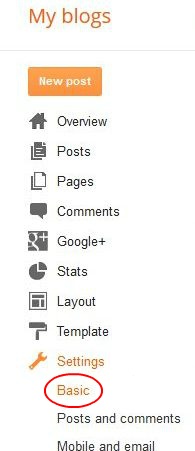
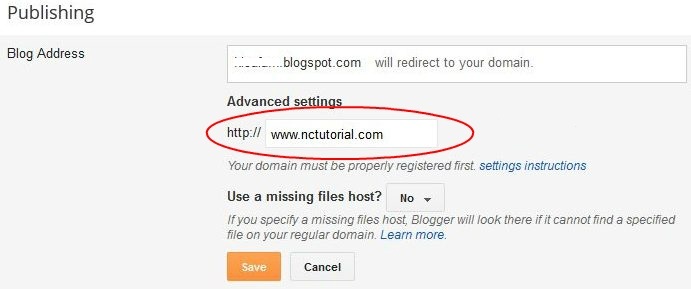
Step 3 – Click on “Add a custom domain” under the “Blog Address” field in the “Publishing” section.

Step 4 – Key in your domain name in the text box and click “Save”.
Step 5 – You will see two CNAME records once the page refreshes.
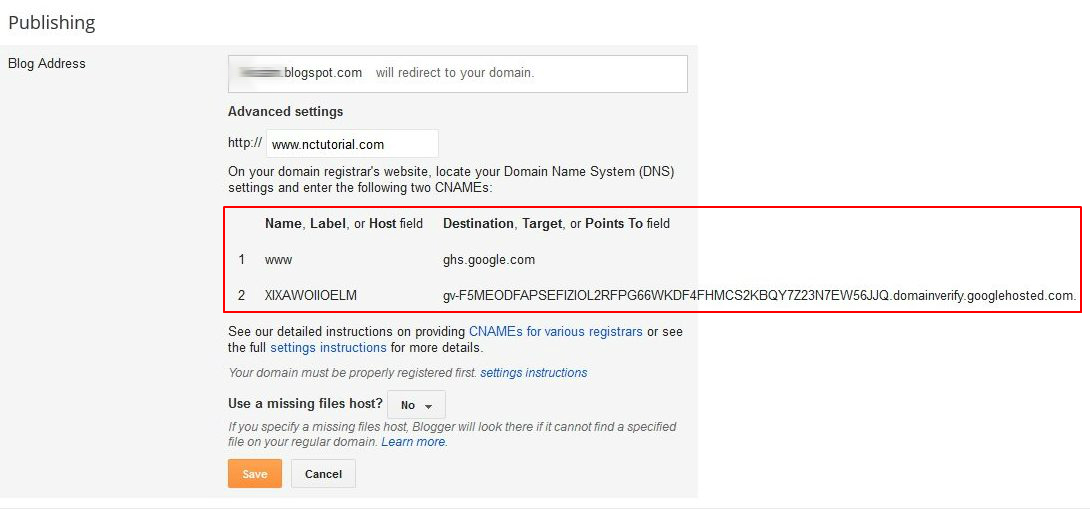
Step 6: Open a support ticket and provide us with the CNAME details.
DEFAULT DNS NAMESERVERS.
NS1.DNSOWL.COM
NS2.DNSOWL.COM
NS3.DNSOWL.COM
